
IPTV Smarters PRO
Skylet – Built to PerformVideo Players & Editors
4.30.00 Reviews
- Version
- 2.3.1
- Installs
- 100.00K
- Age Rating
- Everyone
Screenshots
Our Review of IPTV Smarters PRO
 Analysis by Appyee
I approached IPTV Smarters PRO as a practical media player rather than as a source of television content. That distinction matters from the first screen: the app is designed for user-provided IPTV playlists, so the quality of the experience depends heavily on the playlist or service you already have. In my testing mindset, the app sits between your provider’s connection details and the screen where you actually watch.
That makes it an interesting choice for people who want one place to handle IPTV access through Xtream, M3U, or Stalker connections. It is free to install, aimed at Everyone, and belongs to the video players and editors category. Skylet – Built to Perform is the developer behind it, and the app has reached over one hundred thousand installs with an average rating of 4.3 from more than one hundred ratings.
I would not recommend it simply because someone wants “more channels.” It does not replace a television subscription or create programming by itself. I would recommend looking at it when you already have legitimate playlist credentials and want a dedicated Android player instead of juggling text files, browser pages, or several separate playback tools.
From receiving playlist details to watching on the right screen
I start this section with the practical handoff: getting the right playlist details from a provider, choosing the matching connection format, and checking that the list loads as expected. A careful first setup can save time later, especially when credentials are long or easy to mistype. From there, the next question is how that connection behaves during real viewing.
The starting condition: you need something to load
The smoothest experience begins before opening the app. Your IPTV provider needs to give you usable access details, such as an M3U playlist, Xtream information, or a Stalker connection. If those details are incomplete, expired, or copied with an extra space, the player can appear to be at fault even when the problem is upstream.
I find this is the first important trade-off. A conventional streaming app gives you an account screen, a catalog, and a predictable content source. IPTV Smarters PRO gives you a more flexible doorway, but you are responsible for bringing the doorway’s address. That flexibility is useful for people who switch between playlists or manage their own media sources, while it can feel unnecessarily technical to someone who expects an app to work immediately after installation.
Before entering anything, I would keep the provider’s message open on another device and identify which connection format it uses. Do not guess between Xtream, M3U, and Stalker. Choosing the wrong route can lead to an empty library or a failed connection, and repeatedly retyping credentials makes troubleshooting harder than it needs to be.
A small but valuable habit is to copy the details into a temporary note first, then remove any line breaks that do not belong in the address. Long playlist URLs are especially easy to damage when they wrap across a message. This is not a glamorous feature, but it can save more time than repeatedly reinstalling the player.
Setting up the first connection
Once I have the correct information, I treat setup as a handoff: the provider supplies the connection, and the app turns it into a browsable media source. The important question is not only whether the login is accepted, but whether the resulting groups and channels are organized clearly enough for daily use.
Xtream-style access is generally the most comfortable starting point when a provider supplies a server address, username, and password together. M3U is more direct when you have a playlist URL or file. Stalker is useful only when your service is built around that type of portal. The choice should follow the credentials you received, not personal preference.
After the connection is accepted, I would pause before trying to play the first item. Let the list finish loading, then scan the categories. This simple check tells you whether the handoff worked properly. A connection that technically logs in but produces missing groups, blank entries, or confusing labels may still require attention from the provider.
The app’s role here is best understood as a translator. It takes a service’s playlist structure and presents it as something you can browse on a phone or another Android device. It cannot repair a channel list that the provider has assembled badly, and it cannot make an unavailable stream available. That boundary is important because it prevents unrealistic expectations about what the player can fix.
Turning a long list into a usable routine
Large IPTV playlists can be awkward on a touchscreen. I would not try to explore everything at once. Instead, I would identify the groups I actually use, check a few familiar channels, and then establish a repeatable path for ordinary viewing. The goal is to reduce the number of taps between opening the app and reaching something you already intended to watch.
This is where a dedicated player can feel more practical than opening a raw M3U file in a general media application. A generic player may handle a stream if you paste the right address, but it usually does not provide the same sense of moving through a service’s channel structure. On the other hand, a general player may be preferable if your main need is local video playback rather than IPTV browsing.
My advice is to test several types of entries rather than only one favorite channel. Try a familiar live stream, a less frequently used group, and an item with a longer title. That reveals whether the issue is limited to one source or affects the whole playlist. It also gives you a better idea of how much cleanup or patience the list will require.
The best workflow is to validate the source before blaming the player. If multiple entries fail in the same way, contact the provider or inspect the credentials. If one entry fails while others work, the problem may belong to that individual stream. This distinction keeps troubleshooting focused.
The everyday handoff: from phone to viewing session
A realistic use case is a person who receives a playlist from a legitimate service, loads it during the afternoon, and wants to watch a news or sports channel later without searching through a browser. The handoff is successful when the app turns those supplied details into a stable, understandable route to the intended stream.
For that scenario, I would set up the connection while I have time to correct mistakes, not moments before a program begins. I would also confirm that the phone has a reliable internet connection and enough battery for the session. IPTV playback is dependent on the network, so a player cannot compensate for weak Wi-Fi, congestion, or a provider-side outage.
On a small phone display, the experience is most suitable for casual viewing, checking a channel while away from home, or watching briefly with headphones. If I wanted a longer session, I would prefer a larger screen or a compatible casting arrangement, but the exact comfort depends on the device and the way the stream is delivered. The app should be judged as the playback layer, not as a promise of identical results on every screen.
Another useful workflow is keeping separate provider details clearly labeled. If you use more than one legitimate playlist, vague names such as “TV” can create confusion. A note identifying which service each set of credentials belongs to makes switching less error-prone. The app can only present what you enter; organization outside the app still matters.
What the result feels like when everything lines up
When the credentials are correct and the source is healthy, IPTV Smarters PRO does what I want from this kind of app: it gives a dedicated place to move from a provider’s connection details to actual playback. The appeal is less about decoration and more about consolidating IPTV access in a player built for those playlist formats.
The free entry point lowers the barrier to trying it. The current version is 2.3.1, and the app supports Android 7.0 and later, which makes it relevant to people using older compatible devices as well as newer phones. In-app purchases range from $0.99 to $8.49 per item, so I would check what an optional purchase changes before paying. I would not assume that paying resolves source quality, missing channels, or provider outages.
That last point is worth emphasizing because IPTV apps are often judged unfairly. If a stream buffers, the cause may be the provider, the network, the device, or the stream itself. The player is one part of a chain. Its success should be measured by how clearly it accepts and presents the source, not by whether it can overcome every weakness in that chain.
Compared with a browser, a dedicated player feels cleaner for repeated viewing because the playlist is handled as media rather than as a web page. Compared with a general media player, it is more appropriate when your content arrives through IPTV-specific formats. Compared with an official broadcaster app, however, it may offer less hand-holding and fewer guarantees around catalog quality, account support, and playback consistency.
Where the flow breaks
The first break usually happens at input. A mistyped server address, an outdated password, or the wrong playlist format can stop the process before the app has a fair chance. I would verify the exact connection type and test the details outside a rushed viewing situation. If the provider has sent several addresses, ask which one is intended for this player rather than trying them randomly.
The second break is list quality. A technically valid playlist can still be cluttered, poorly labeled, or filled with unavailable entries. This is a genuine limitation of the IPTV model: the player’s interface may be fine, but the material it receives can be untidy. People who want a polished catalog maintained by one company may be happier with a conventional streaming service or an official television app.
The third break is playback stability. Buffering, delays, and sudden failures can come from the network or the source. I would compare a problematic stream with another entry, then try the same connection under a stronger network before concluding that the app is responsible. Restarting repeatedly is less useful than isolating which part of the workflow has failed.
There is also a privacy and trust consideration in the practical sense: you are entering access details supplied by a service into a third-party player. I would use only playlists and subscriptions I am authorized to access, avoid sharing credentials casually, and remove old connection information when I no longer use it. The app is for user-provided IPTV playlists, so responsible sourcing remains part of the user’s job.
People who want local files, editing tools, or a simple player for videos stored on their phone should probably choose a different category of app. Despite being listed among video players and editors, this particular tool makes the most sense around IPTV playlist workflows. It is not the first choice I would make for trimming clips, organizing a personal movie library, or replacing a full desktop media center.
Who should use it and who should skip it
I see the strongest fit for someone who already has legitimate IPTV access and wants one Android application for Xtream, M3U, or Stalker connections. It is also suitable for users who understand that playlist maintenance is part of the experience and are comfortable checking credentials when something goes wrong.
I would be more cautious recommending it to a first-time viewer who expects a ready-made catalog. The app’s free installation may sound simple, but the real starting requirement is a working source. Without one, there is little to evaluate beyond the setup process.
I would also steer away from it if your priority is guaranteed programming support, a carefully curated interface, or a single company responsible for both content and playback. An official service may cost more or be less flexible, but it can provide a clearer support path. IPTV Smarters PRO is better when flexibility and playlist compatibility matter more than a fully managed experience.
My final take after following the whole workflow
IPTV Smarters PRO is a focused tool for turning user-provided IPTV access into a more manageable viewing routine. I like its support for several common connection approaches and the fact that it is free to start. The rating of 4.3 reflects a generally positive reception, while the more than one hundred thousand installs suggest that it has found an audience beyond a tiny group of enthusiasts.
Still, I would not describe it as effortless. The app sits in the middle of a chain, and the quality of the final result depends on the credentials, playlist organization, network, and stream source that come before it. That is not a flaw unique to this player, but it is the main reality a new user should understand before installing.
My recommendation is straightforward: use it when you already have a lawful, working IPTV playlist and want a dedicated Android playback route. Prepare the connection details carefully, test more than one entry, and separate provider problems from player problems before spending money on optional purchases. If you want a ready-to-watch catalog or a general-purpose video editor, choose an alternative built around those needs instead.
For the right user, the outcome is practical: fewer improvised browser sessions, a clearer handoff from playlist to playback, and a single place to manage supported IPTV sources. For everyone else, the setup friction may outweigh the flexibility. Its real strength is not creating television content; it is making an existing IPTV workflow easier to use.
Verdict
Strengths of IPTV Smarters PRO
- Supports multiple playlists and IPTV accounts in one app.
- Offers parental controls to restrict access to selected content.
- Includes a built-in search option for quickly finding channels and shows.
- Compatible with external players for greater playback flexibility.
- Provides subtitle and audio-track options when supported by the stream.
Limitations of IPTV Smarters PRO
- Does not provide TV channels or content; users must supply a legal IPTV subscription.
- Playback quality depends heavily on the provider and internet connection.
- Some advanced features may require a premium version or separate payment.
- Certain streams may lack program information, logos, or accurate channel listings.
- The interface can feel crowded when managing large playlists or many categories.
Similar Picks in This Category
View All
Google TV
Google LLC3.9

iTunes
Apple4.7

YouTube
Google LLC3.8

MX Player
Amazon Mobile LLC4.2

CapCut - Video Editor
Bytedance Pte. Ltd.3.5

PLAYit-All in One Video Player
PLAYIT TECHNOLOGY PTE. LTD.4.5
Frequently Asked Questions
What is IPTV Smarters PRO and what does it do?
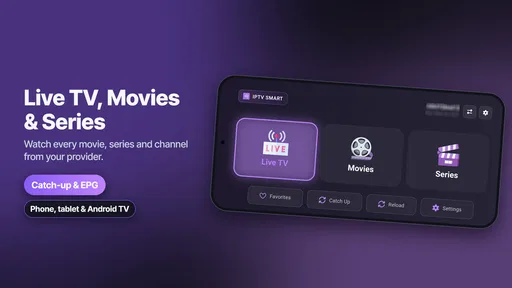
IPTV Smarters PRO is a media player designed to organize and stream television channels, movies, series, and other video content from a compatible IPTV provider. It does not normally supply channels or subscriptions by itself. After installation, users generally connect their provider’s credentials, playlist, or portal information, depending on the service and device. The available features can vary between Android, iOS, smart TV, and other supported platforms.
Does IPTV Smarters PRO include free channels or a built-in subscription?
No, IPTV Smarters PRO should generally be understood as a player rather than a television service. The application does not automatically include a catalog of channels, movies, or live events. You need a separate IPTV subscription or legally provided playlist from a service that has the necessary broadcasting rights. Before downloading or paying for any IPTV service, check its legitimacy, privacy policy, supported devices, and terms of use to avoid unreliable or unauthorized content providers.
How do I set up IPTV Smarters PRO after installing it?
The setup process depends on the information supplied by your IPTV provider. Common options include entering an Xtream Codes username, password, and server URL, loading an M3U playlist, or adding a compatible portal address. Once the details are accepted, the application may organize content into live TV, video-on-demand, and series sections. If login fails, carefully verify the server address, account status, internet connection, and whether your provider supports the selected login method.
Is IPTV Smarters PRO safe and legal to use on Android or iOS?
The application itself is a streaming player, but the legality of what you watch depends on the source of the content and the rights held by your IPTV provider. Use services that clearly demonstrate authorization to distribute their channels and videos. Download the app only from a trustworthy official store or verified source, review requested permissions, and avoid modified APK files. You should also protect your account details and avoid entering credentials into unofficial clones or suspicious websites.
What should I do if IPTV Smarters PRO buffers, crashes, or does not play channels?
Playback problems can result from several causes, including a weak Wi-Fi connection, overloaded provider servers, expired account details, unsupported formats, or an outdated application. Start by testing another network, restarting the app and router, and checking whether other channels work. Updating the app and device software may also help. If only one provider’s content fails, contact that provider. Avoid assuming the player is responsible when the stream itself is unavailable or poorly maintained.
